
What can I do with it?
All data logger inputs, outputs and additional features are illustrated in Figure 1.
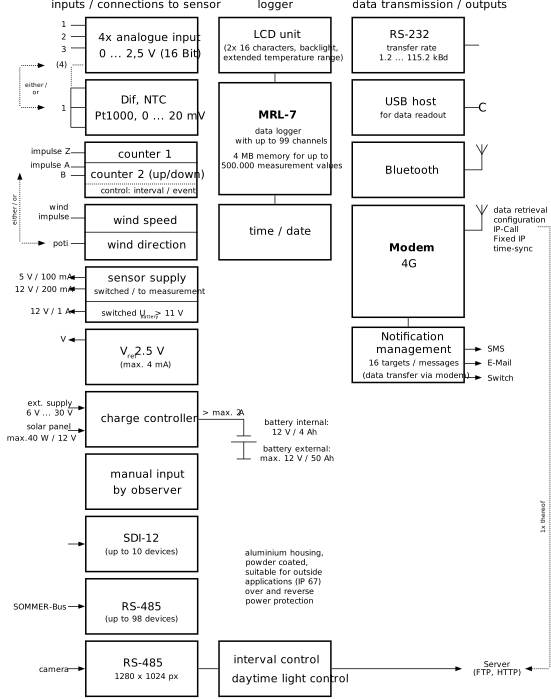
Figure 1 Data logger in- and outputs
Measurement options
The MRL-7 data logger is designed to acquire measurements of the following sensor types:
- Analog sensor with voltage and current output
- Resistive sensors, e.g. wind vanes with potentiometer output
- Sensors with frequency output, e.g. anemometers
- Sensors with pulse output, e.g. tipping bucket rain gauge
- Digital sensors using SDI-12 and Sommer RS-485 protocols
Analog measurements
The analog input terminals can be configured to different input signals. The available options are listed below.
Counts & frequency
The available counter and frequency inputs are listed below:
SDI-12 data acquisition
The MRL-7 provides one SDI-12 port for communication with SDI-12 sensors. A total of 62 SDI-12 sensors with the addresses 0...9, a...z and A...Z can be connected.
Serial RS-485 data acquisition
The RS-485 port of the MRL-7 provides an interface to connect digital SOMMER sensors using the Sommer Bus Protocol (SBP). A total of 98 Sensors with addresses 01...98 can be connected.
Sensor power supply
Sensors can be powered by the voltage supply terminals listed below. Please consult the sensor manual for information on power requirements.
|
Output |
Maximum load |
|
|---|---|---|
|
5V-Out |
max. 100 mA |
|
|
12V-Out |
max. 200 mA |
|
|
2.5V Reference |
4 mA |
|
|
9 ... 28 VDC supply |
1 x 1.10 A |
max. 2 A |
|
Switched 9 ... 28 VDC supplies |
3 x 0.50 A |
|
Communication options
Direct connection to a PC
Communication between the MRL-7 and a PC can be established with the supplied USB to RS-232 converter. The Commander software or any terminal editor can be used to view and edit the data logger settings. Among others, the Commander provides a Communication assistant to connect to the data logger.
Bluetooth
A connection between the MRL-7 and your PC can also be established via Bluetooth. If your PC is equipped with an internal or external Bluetooth-device, the Communication assistant of the Commander software can connect to the data logger (see Bluetooth for detailed instructions).
Modem
The MRL-7 is equipped with a wireless 4G-modem that can use the 2G, 3G and 4G services. This allows remote communication with the data logger via IP-Call, HTTP/FTP data transfer, e-mail and SMS-messages as well as time synchronization via NTP.
Socket connection
The socket of the MRL-7 can be used for a direct TCP/IP connection. This option may be used by organizations with their own APN that allows a static IP address.
Radio connection
Sommer Messtechnik offers ultra narrow band radios for remote communication between the MRL-7 and a base station, or between one or multiple sensors and the MRL-7 as base station. See Sommer radio devices for available products.
Data storage options
Internal data storage
Acquired measurement data are stored in a flash memory of 4 MB. This is equivalent to up to 500'000 values, depending on resolution and the number of acquired variables.
USB flash drive
Data stored internally can be collected on a USB flash drive. After connection to the data logger and a keyboard command all data since the last collection are transferred to the USB flash drive. See How to copy data to a USB flash drive for detailed instructions.
Remote data storage
The acquired data stored in the data logger can be transmitted to a HTTP or FTP server. A maximum of 4 servers, each with a different transmission interval, can be configured. At the end of each interval the latest image and all data since the last successful transmission are sent. See How to set up data transmission for detailed instructions.